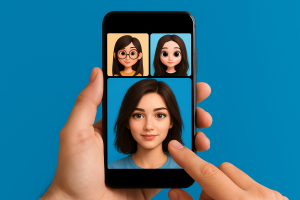
At some point, you may have accidentally deleted an important photo from your phone. Fortunately, with the advancement of technology, there are now apps to recover deleted photos from your cell phone that solve this problem in a simple way. Just like other essential everyday tools, these apps have become indispensable for those who value their memories.
Plus, many of these apps are free and can be downloaded directly from the PlayStore. This saves you time and efficiency, especially when you want to restore images quickly.
How do apps recover deleted photos?
When a photo is deleted, the file does not completely disappear from memory. In fact, the space is simply marked as available. Therefore, as long as this space is not overwritten, the data can still be recovered.
In this sense, the apps to recover deleted photos use this technical loophole to locate and restore lost images. This functionality is useful for both recent files and older photos, as long as the device has not been used much since the deletion.
Furthermore, most of these apps operate with just a few taps, without the need for root. This makes life easier for those looking for practicality and security at the same time.
What are the best apps for recovering images?
1. DiskDigger
O DiskDigger is one of the best-known applications in this segment. It allows you to deeply scan your internal memory and restore deleted images quickly. In fact, its preview system makes it much easier to choose the files you want to recover.
Although it works best with root access, the app also offers satisfactory results without it. For this reason, it is ideal for both beginners and experienced users.
In addition to all this, DiskDigger takes up little memory space, making it suitable even for devices with limited performance. For those who want a practical and free solution, just download now on the PlayStore.
DiskDigger photo/file recovery
Android2. Dumpster
Among the smartest apps, Dumpster stands out for working as a virtual recycle bin. In other words, it stores all automatically deleted files. This includes photos, videos and documents.
This makes recovering images even easier. In addition, the app allows you to set a retention time for deleted files, ensuring full control over the process.
Its interface is modern and intuitive, and you can automatically back up your photos with just one click. If you don't already have a trash app on your phone, Dumpster can be downloaded for free from the official store.

Dumpster: Photo/Video Recovery
Android3. Restore Image (Super Easy)
The name already reveals the main difference of the Restore Image: It is extremely simple to use. Even those who are not familiar with technology can operate the application without difficulty.
As soon as you open it, the app performs a quick scan and displays the photos available for restoration. In addition, it does not require root to work, making it a safe and lightweight option for any device.
Like the previous ones, this app is free and can be installed from the PlayStore. If you are looking for speed and satisfactory results, it is worth doing the download. download now.

Recovr: Deleted Photo Recovery
AndroidAdvantages of using these applications
Use apps to recover deleted photos from your cell phone brings clear benefits. Firstly, it prevents despair after losing important photos. Secondly, it offers quick solutions without the need for technical knowledge.
Check out some additional benefits:
- Intuitive and easy to navigate interface
- Works without root in most cases
- Allows you to restore photos, videos and other files
- Ideal for freeing up space and managing files
- Integration with automatic backup
- Compatibility with various Android models
- Available for free download
Additionally, these apps usually have active technical support and constant updates. This ensures a safer and more efficient experience for the user.
How to avoid deleting photos again?
Prevention is always better than cure. Therefore, when recovering your photos, it is important to take some precautions to avoid facing the same problem in the future. Here are some useful tips:
- Turn on automatic backup in Google Photos
- Use a trash app like Dumpster
- Transfer old files to your computer regularly
- Avoid excessive cache clearing
- Beware of apps that promise to free up space but can actually delete files
By taking these measures, your images will remain safe, even in cases of human error or system failure. This way, you avoid headaches and keep your memories always accessible.
Download now and recover everything easily
If you have recently lost images, don't wait any longer. The longer it takes, the less chance you have of full recovery. Therefore, download app expert, run the scan and see your photos return to the gallery.
With the apps to recover deleted photos, your visual history can be restored in just a few minutes. Take advantage of this effective solution that has already helped millions of people around the world.
Conclusion
Deleting photos by mistake can be frustrating, but thanks to technology, there are now ways to solve this problem without complications. With apps to recover deleted photos from your cell phone, you no longer need to worry about accidental loss.
Apps like DiskDigger, Dumpster and Restore Image offer fast, safe and intuitive solutions. Plus, they’re free and available on the PlayStore. So don’t waste any time: download now, run the scan and recover your memories with ease.
What to look for before installing
- Where do your images go?. Tools that use cloud processing upload the photo. Read the policy before sending an image of a document or a child.
- It works without internet. Editors who process photos on their own device work offline. Those that rely on a server do not—and send your photo externally.
- Resolution of the exported file. Some reduce the image size when exporting without a signature. If the photo is for printing, this is a crucial factor.
- Watermark on the free version. This is the most common trick: the app lets you edit for free, but then stamps the logo on it when you save. Check this before investing your time.
What these apps don't do
Before installing, it's worth managing your expectations: there are things that no app in this category delivers.
- They don't remove watermarks from third-party photos. Besides not working properly, using the image without a license is a copyright violation.
- Beauty filters alter the image; they don't alter the person. It's important to remember this when comparing the result to an unedited photo.
- Recovering deleted photos only works on images that haven't been overwritten yet, and the chances of success decrease with each use of the device.
- No app can see through clothes or walls. What exists is simulation — a generated image, not a captured image.
Frequently Asked Questions
Is it possible to recover a deleted photo?
If there's a backup in Google Photos or iCloud, yes. Without a backup, only if the space hasn't been overwritten—and that chance drops quickly.
Does the photo lose quality when edited?
Each export recompresses the file. Edit once and save, instead of saving after each adjustment.
Is the premium version worth paying for?
It's worthwhile if you edit frequently and need high-resolution export or to remove the watermark. For occasional use, the free version is sufficient.
Is a free editor safe?
Check the permissions requested. A photo editor does not need access to contacts, messages, or microphone.
Will my photos go to the cloud?
It depends on the app. Those that do everything on the device work offline; those that use a server send the image externally.
Step-by-step to get started
- Crop with the purpose of taking into account where the photo will end up. Square and vertical 4:5 for social media, 16:9 for screen. Crop after exporting and recompress again.
- Export at the highest quality available. If you're going to print, look for the high-resolution export option — some free versions reduce the resolution without warning.
- Save only once. Each export process recompresses the file. Make all the necessary adjustments and export at the end.
- Work on a copy. Duplicate the image before editing. Good apps do this automatically, but double-checking prevents losing the original.
Traps that catch almost everyone
- Saving after each adjustment and watching the image lose sharpness without understanding why.
- Discovering the watermark only when exporting, after half an hour of editing.
- Send a photo of a document or a child to an editor who processes it in the cloud.
- Increasing the resolution in the hope of revealing detail — the program estimates pixels, it doesn't retrieve information.
The alternative that is already included in the system
The phone's built-in gallery editor already handles cropping, light adjustment, object removal, and perspective correction in recent versions of Android and iPhone. For quick adjustments, it solves the problem without installing anything or sending the image externally.